System Health Monitoring with Microsoft Teams
Monitors system health and posts failure and downtime alerts to the right Microsoft Teams channels.
In the mine
System Health Monitoring with Microsoft Teams, where it works.
Key features
- Critical failure and downtime alerts posted to designated Teams channels
- Alerts reach the responsible team without anyone watching a screen
- Works inside the Teams workflows your people already use
- A record of what was reported and when
What it helps with
- You getFaster recovery, fewer blind spotsDowntime is shorter because problems are found by the system, not by a user noticing missing data.
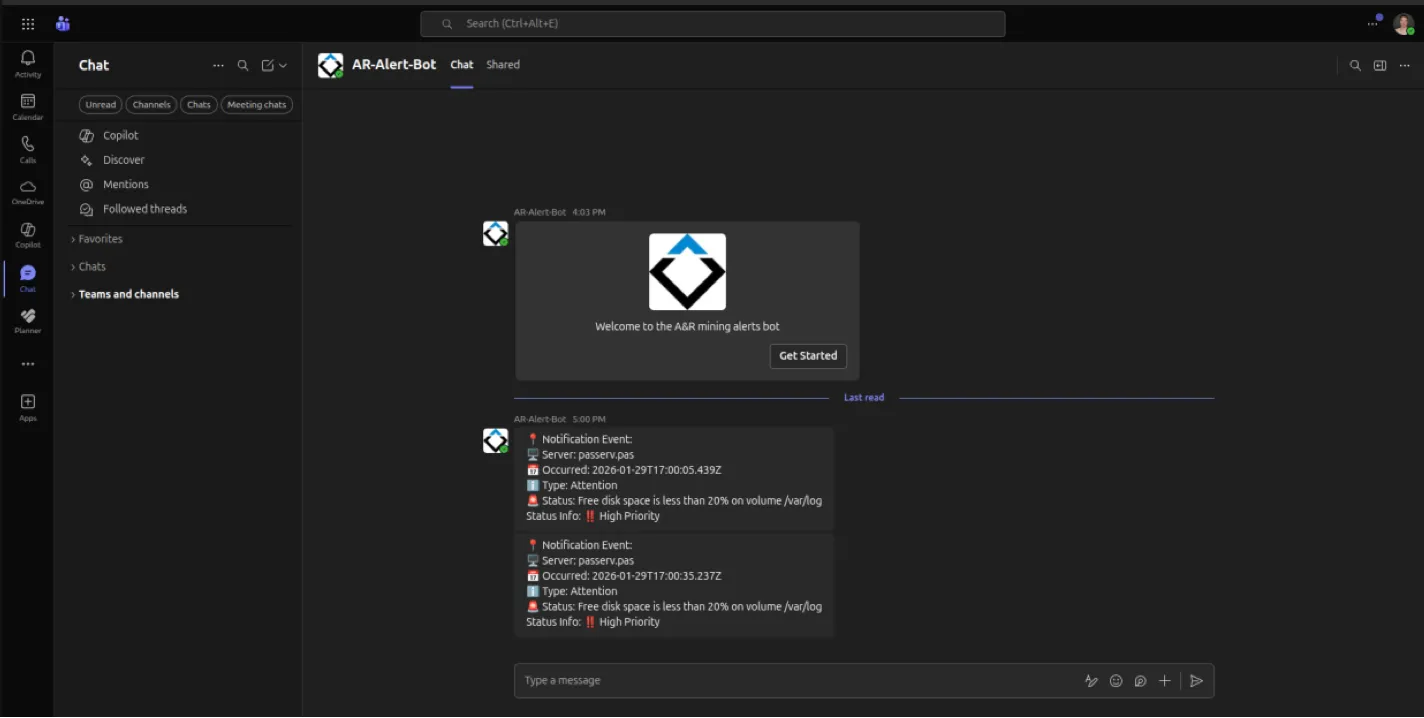
- You seeA failure is announced the moment it happensThe alert arrives in Teams with what failed and when, so the right person sees it first.
- ImprovesVisibility · Productivity
ARMobile · System Health Monitoring with Microsoft Teams
How it works
From a click to a result.
- 01 · You do
Choose which Teams channel gets which alert
Route system health alerts to the support, control room or site teams responsible.
- 02 · You see
A failure is announced the moment it happens
The alert arrives in Teams with what failed and when, so the right person sees it first.
- 03 · You get
Faster recovery, fewer blind spots
Downtime is shorter because problems are found by the system, not by a user noticing missing data.
What it does
System Health Monitoring keeps watch over the platform and its connected systems. Critical failures and downtime are posted to designated Microsoft Teams channels for rapid response, so support teams hear about a problem as it starts.
- Critical failure and downtime alerts posted to designated Teams channels
- Alerts reach the responsible team without anyone watching a screen
- Works inside the Teams workflows your people already use
- A record of what was reported and when
See System Health Monitoring with Microsoft Teams with your own data.
Book a walkthrough and we will show you this feature on a working mine simulation.